TopNote
Your now playing, right in the menu bar.
TopNote is a self-directed NSWEB product: a macOS menu bar app that sits quietly next to the clock and shows exactly what's playing — Spotify, Apple Music, YouTube in a browser tab, or anything else — with a scrolling title, live artwork, and one-click transport controls, no host app switching required.
Unlike most "now playing" widgets, which quietly assume you'll only ever use Apple Music, TopNote is source-agnostic by design: the same status item works identically whether the audio is coming from a native app or a random tab in Chrome.
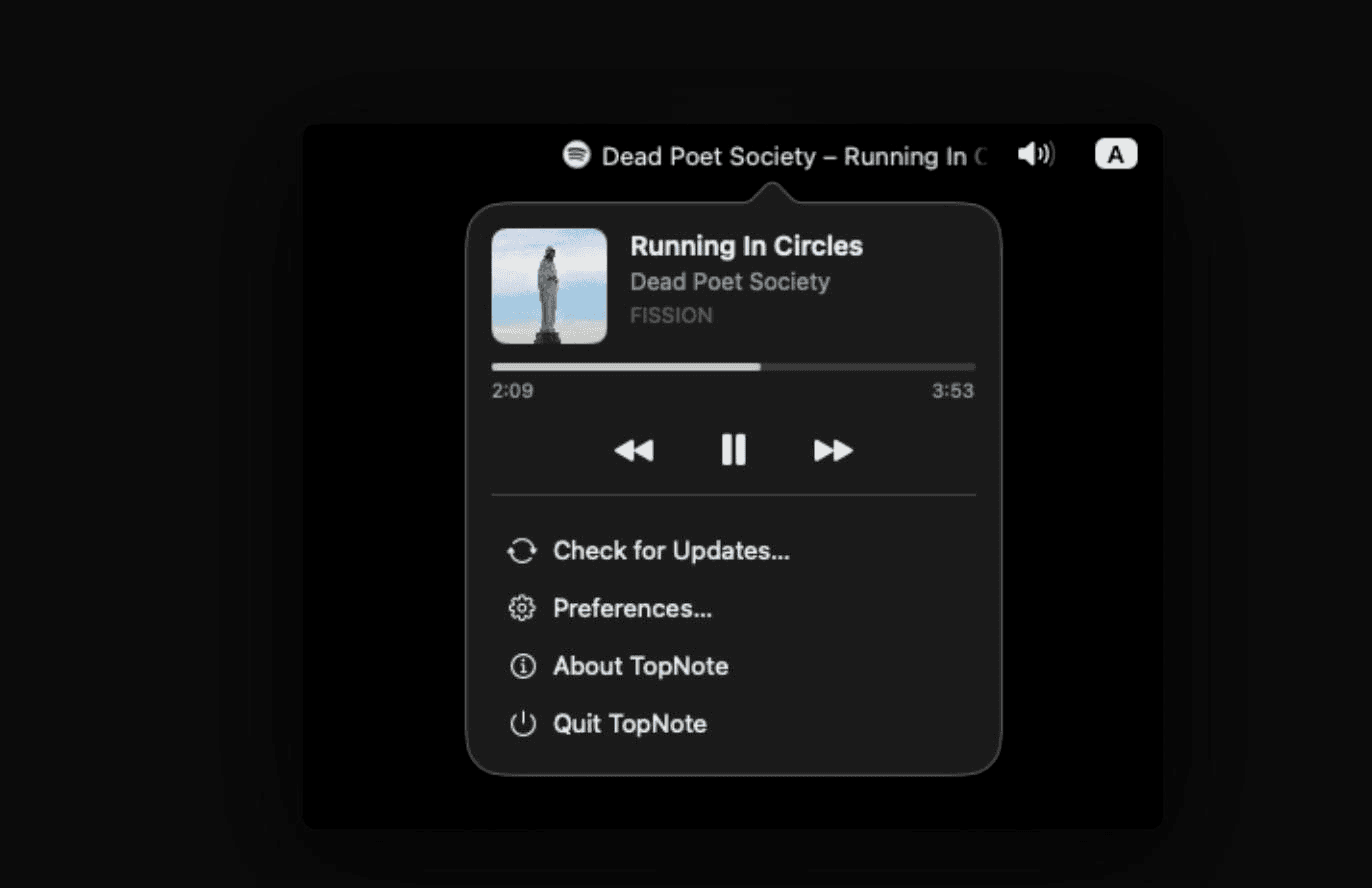
1. TopNote's menu bar popover — artwork, live progress, and transport controls for whatever's actually playing
The Challenge
A menu bar "now playing" widget sounds like a weekend SwiftUI project until you actually try to build one properly:
- SwiftUI's
MenuBarExtradoesn't give you real control over its label. Constraining its width and clipping overflow — required for a scrolling marquee — silently failed under multiple approaches; the menu bar kept rendering the full, uncapped text regardless of frame or clip modifiers. - macOS actively restricts third-party access to now-playing metadata. The private
MediaRemoteframework will tell a sandboxed third-party process whether something is playing, but the actual title/artist/artwork payload comes backOperation not permitted— a real platform lock-down, not a bug to work around in the usual way. - Settings that touch a live UI element are easy to get wrong. Preferences for icon size, marquee width, and scroll speed all redraw a persistent
NSStatusItem— without care, every slider drag mid-edit repaints the real menu bar before the user has committed to anything. - No App Store distribution. Reading now-playing metadata at all requires a workaround Apple doesn't sanction, ruling out Mac App Store review — so updates have to be self-hosted and self-checked.
Our Solutions

Swift
Next.js

Typescript

Tailwind CSS

Docker
1. A hand-drawn status item instead of MenuBarExtra
After confirming SwiftUI's menu bar API couldn't clip or measure its own label reliably, TopNote drops down to a raw NSStatusItem and draws its contents directly: icon and text composited into an NSImage and reassigned to the button at roughly 30fps while scrolling. This is the only way to get real, pixel-accurate control over a menu bar element — fractional-pixel scroll offsets, per-edge alpha fades on clipped text, and a 24pt scroll threshold that stops a few stray pixels of overflow from reading as jitter instead of a deliberate animation.
The popover itself — artwork, title, live progress bar, transport controls — stays in SwiftUI, since that's a normal window with no such constraints.
2. Two now-playing sources, one seamless handoff
TopNote's primary source is mediaremote-adapter, a package that works around Apple's lockdown by spawning /usr/bin/perl — one of the few binaries macOS still grants the MediaRemote entitlement to — and having it load a small dylib that makes the actual private-framework calls, streaming the result back as JSON. It's what makes browser support possible at all, real artwork included.
Because that trick relies on what's arguably an Apple oversight, it's watched by a 3-second watchdog: if the adapter never responds, or its listener process dies mid-session, TopNote falls back permanently to polling Music.app and Spotify over AppleScript for that run — slower, no browsers, but a stable and sanctioned API. Playback commands (play/pause, skip) are routed transparently to whichever source is actually active, so the UI never has to know which one it's talking to.
3. A draft-and-commit settings model
Preferences — icon visibility and size, marquee width, scroll speed, hide-title-when-paused — bind to an editable MarqueeSettingsDraft, not to the live app settings directly. A real-time preview inside the Preferences window renders the exact same drawing code the actual status item uses, so what's previewed can't visually drift from what ships. Nothing touches the real menu bar until "Save" commits the draft; "Cancel" discards it, and "Reset to Defaults" only resets the in-progress draft, not the live app.
4. A self-hosted release and update channel
With no App Store distribution available, TopNote ships as an ad-hoc signed DMG built with create-dmg, and checks for new versions itself: an in-app update checker polls a version endpoint on TopNote's own Next.js website on launch and every 24 hours, comparing against the running build's version. Background checks stay silent unless there's something new, remember which version the user chose to skip, and a manual "Check for Updates…" row always reports back — including a plain "you're up to date" — so the update path never feels like a black box.
Outcome
- A menu bar widget that actually behaves like one — pixel-accurate scrolling text and icon-only-when-paused states no SwiftUI-only implementation could reliably reproduce.
- Real cross-app now-playing support, including browsers, by working around a genuine macOS platform restriction rather than settling for Apple Music-only coverage.
- A settings experience with zero mid-edit flicker, thanks to a draft/commit model that keeps every slider drag isolated from the live status item until the user explicitly saves.
- A fully self-hosted distribution loop — DMG, version feed, and in-app update prompts all served from TopNote's own infrastructure, independent of the Mac App Store.